A comprehensive weather monitoring tile with six layouts, hybrid mode combining local sensors with API forecasts, and extensive customization options - powered by OpenWeather and Open-Meteo APIs.
 Overview
Full disclosure: This tile started as an educational “pirate copy” (in good fun!) of the excellent Weather Tile by @josh. I used Josh’s original tile to learn Custom Tile development, then extensively modified it to meet my specific needs.
What I added beyond the original:
- Hybrid mode - combines local weather station data with API forecasts
- Open-Meteo integration - better hourly rain probability data
- Horizontal forecast layouts - 6 or 12-hour displays
- Local sensor support - GW2000B weather station integration
- Gold highlighting - visual distinction for local sensor data
- Expanded forecast options - daily or hourly views
 Key Features
Six Layouts
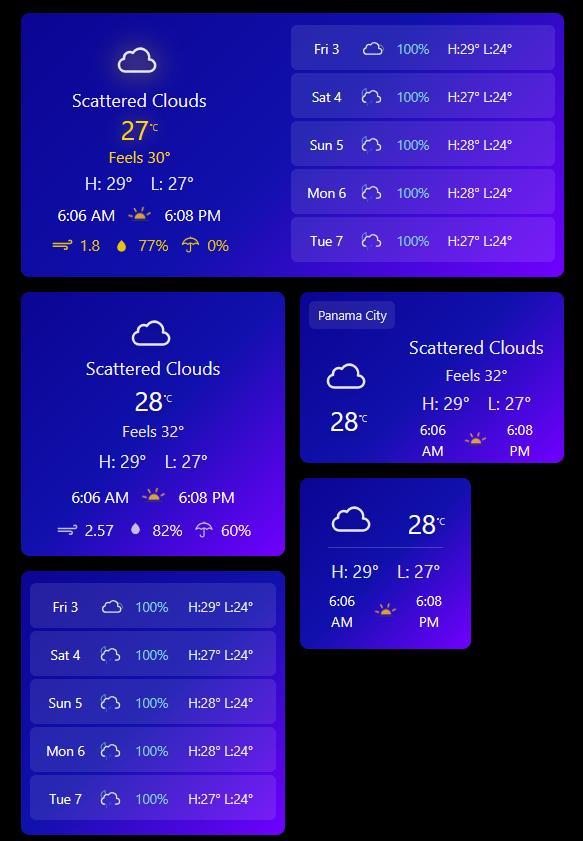
- Default - Current conditions + 5-day forecast side-by-side
- Today - Large current conditions display
- Today Wide - Current conditions in wide format
- Today Mini - Compact current conditions
- Forecast - Till 6 days forecast focused view
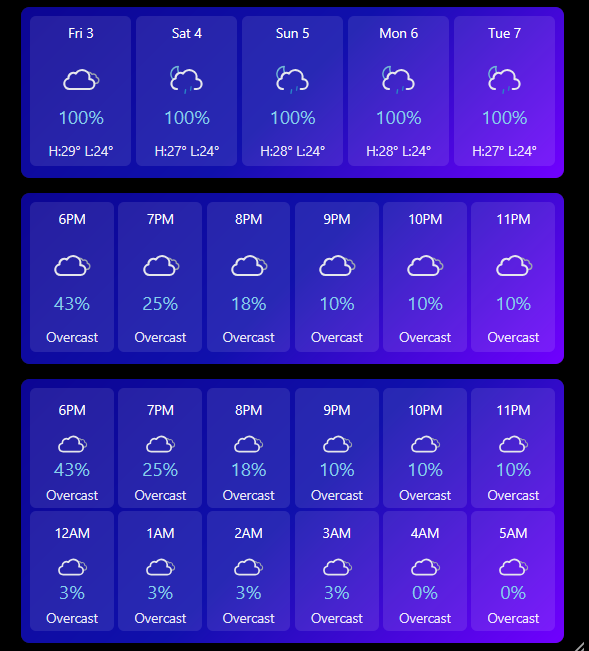
- Forecast Horizontal - Horizontal forecast cards (6 or 12-hour)
Hybrid Mode (Local + API)
Combine real-time measurements from your weather station with professional API forecasts:
- Current conditions from local sensors (highlighted in gold #FFD700)
- Forecasts from OpenWeather/Open-Meteo
- Automatic fallback if sensors disconnect
- Supports GW2000B weather station and similar devices
Supported Local Sensors
- Temperature (required for hybrid mode)
- Humidity (optional)
- Wind Speed (optional)
- Rain Rate (optional)
- Feels Like Temperature (optional)
API Integration
- OpenWeather v2.5 - Multi-endpoint (weather + forecast)
- OpenWeather v3.0 - OneCall API
- Open-Meteo - Hourly forecasts with better rain probability
 Requirements
Required:
- SharpTools Premium subscription
- OpenWeather API key (get free key)
Optional (for Hybrid Mode):
- Weather station (e.g., Ecowitt GW2000B)
- Home Assistant or similar integration platform
- SharpTools device mappings for sensors
 Quick Import
Import SharpTools Tile: Weather Information v2.5
 Configuration
Step 1: Basic Setup
API Key (required):
- Get free key from OpenWeatherMap
- Enter in tile settings
Location:
- Format:
latitude,longitude - Example:
8.9823,-79.5199 - Find coordinates: LatLong.net
API Version:
3-0onecall- OneCall API (recommended, requires paid key for some features)2-5multi- Free tier compatible
Units:
metric- Celsius, km/h, mmimperial- Fahrenheit, mph, inches
Step 2: Layout Selection
Choose from six layouts based on your needs:
- Default - Best for 2x2 or 3x2 tiles
- Today - Best for 1x1 or 2x2 tiles
- Today Wide - Best for 3x2 or 4x2 tiles
- Today Mini - Best for 1x1 compact tiles
- Forecast - Best for 2x3 or full width tiles
- Forecast Horizontal - Best for 4x3 or 6x3 wide tiles
Step 3: Display Options
Show Hourly Forecast: Switch to hourly instead of daily forecast
Show 12 Hours: Display 12-hour forecast in 2 rows (horizontal layout only)
Show Location Name: Display city name at top
Refresh Interval: Minutes between API updates (minimum 1)
Step 4: Hybrid Mode Setup (Optional)
Data Source: Select Hybrid (Local + Forecast)
Required for Hybrid Mode:
- Local Temperature Thing - Device with
temperatureMeasurement
Optional Local Sensors:
- Local Humidity Thing - Device with
relativeHumidityMeasurement - Local Wind Speed Thing - Device reporting wind speed
- Local Rain Rate Thing - Device reporting precipitation rate
- Local Feels Like Thing - Device with feels-like temperature
GW2000B Weather Station Mapping:
Outdoor Temperature    → attribute: "temperature"
Humidity              → attribute: "humidity"
Wind Speed            → attribute: "state"
Rain Rate Piezo       → attribute: "state"
Feels Like Temperature → attribute: "temperature"
Visual Indication: Local sensor data appears in gold (#FFD700) color to distinguish from API data.
 Why This Tile Was Created
The Original Tile: Josh’s Weather Tile was excellent, but I wanted:
- Integration with my local weather station
- Better rain probability data
- 12-hour rain forecast
 Technical Highlights
Hybrid Mode Data Priority:
- Local sensors (when available) - shown in gold
- OpenWeather API (fallback)
- Open-Meteo (hourly forecasts)
 Screenshots
Bottom image: Multiple layout variations including Default, Today, Today Wide, Today Mini, and Forecast layouts showing the flexibility of the tile.
Top image: Forecast Horizontal layout showing 12-hour forecast in two rows with rain probability, temperatures, and weather icons.
 Resources
GitHub Repository: GitHub - wilsonmarcolin/sharptools-custom-tiles: SharpTools Custom Tiles by Wilson Marcolin & Claude AI
Original Tile by Josh: Weather Tile - Open Weather - Current and Forecast
APIs:
Weather Station Integration:
Other Tiles in Collection:
- AC Control - Climate control
- SpeedTest Monitor - Network monitoring
- UPS Information - Power monitoring
- Humidity Comparison - Smart ventilation
 About the Developer
I’m not a professional developer - I’m someone who learned by studying Josh’s excellent original Weather Tile and then extensively modifying it to meet my needs. This tile represents hundreds of hours of learning, experimentation, and iteration.
If you encounter any issues or have suggestions, feel free to share feedback! However, please understand that support may be limited as this is a personal learning project shared freely with the community.
Apologies in advance for any operational flaws!
 License & Disclaimer
MIT License - Free to use, modify, and distribute
USE AT YOUR OWN RISK - This tile displays weather data from external APIs and optional local sensors. The accuracy depends on data source reliability. The author is not responsible for incorrect forecasts, missed weather events, or decisions made based on displayed data.
Attribution: Built upon the foundation of Josh’s Weather Tile - used with educational intent and appreciation.
See GitHub repository for complete license and documentation.
Version: 3.0 (October 2025)
Authors: Wilson Marcolin & Claude.AI
Original Concept: Josh (@josh)
Tested with: SharpTools Custom Tiles v0.2.1+
Powered by: OpenWeather, Open-Meteo
Tags: #custom-tile #weather #forecast #hybrid #local-sensors #openweather #open-meteo #multi-layout #gw2000b #weather-station