 Upcoming Events – Multi-Calendar Agenda Tile
A clean, unified agenda tile that merges up to N calendars into a single chronological list – national holidays, international observances, and your personal travel itinerary (TripIt) – with flags, localized dates, and a “in X days” countdown. Powered by Home Assistant iCal feeds.
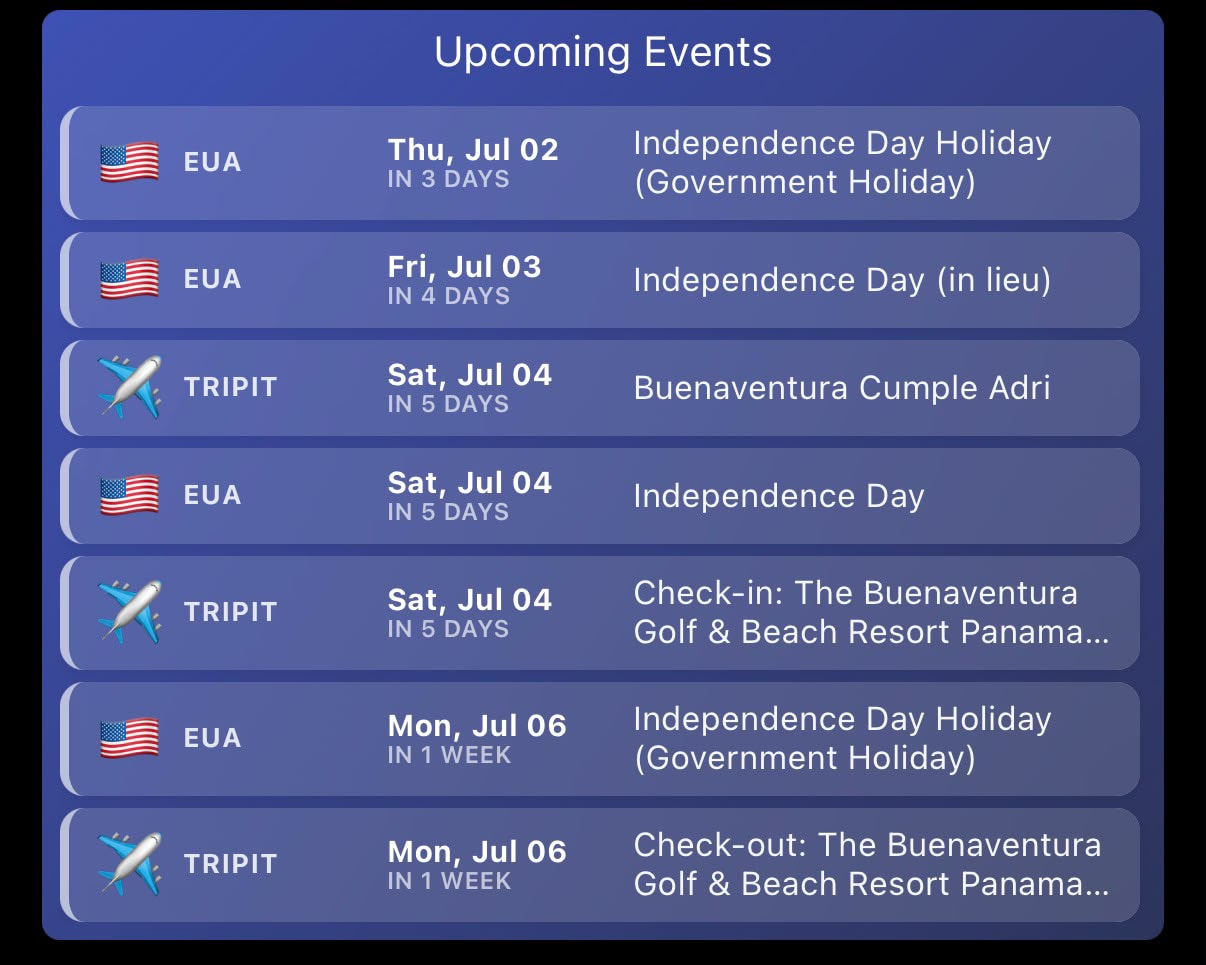
 Overview
The native SharpTools calendar tile is great, but it has two limitations: it only shows a fixed 7-day window, and it displays one calendar at a time. So if your next holiday is three weeks away, the tile sits empty – and you can’t see holidays, observances, and travel plans side by side.
Upcoming Events solves both. It pulls several iCal feeds through Home Assistant, merges them, sorts everything by date, and shows the next N events as one tidy list – no matter how far away they are. Each row shows a flag/icon, the source, a localized date with a relative countdown, and the event description.
Perfect for:
- Seeing the next public holidays at a glance (your country + neighbors)
- Keeping an eye on your upcoming trips and check-in/check-out dates
- A single “what’s coming up” tile that blends work holidays, observances, and travel
The display is intentionally simple; all the heavy lifting (fetching, merging, sorting, trimming) happens in Home Assistant, which keeps the tile fast and resilient to feed changes.
 Features
- Up to N Merged Calendars – holidays, observances, and travel in one list
- Chronological Order – next events first, regardless of how far out they are
- Per-Row Flag / Icon:
 UN flag for international calendars
 Country flags (ISO-3166 based)
 Travel icon for TripIt itineraries
 Custom emoji support
- Three-Language Localization – English, Português, Español (dates + countdown)
- Normalized Date Format – consistent
Ddd, Mmm DDacross all languages - Relative Countdown – “In 6 days” / “Em 6 dias” / “En 6 días”
- Configurable Event Count – show as many or as few as you like
- Two-Line Descriptions – long titles wrap and clamp with an ellipsis
- Vertical Scroll – set a shorter tile height and scroll through more events
- “Today” Emphasis – the current day is highlighted with an accent color
- Optional Gradient Background
- Responsive Auto-Fit – single codebase scales across phone, tablet, and desktop
 Requirements
Required:
- SharpTools Premium subscription
- Home Assistant (this tile reads its data from HA, exactly like exposing Strava or any other sensor)
- The iCal Sensor integration by tybritten (installed via HACS) – it creates one sensor per upcoming event for each calendar
- A Template Sensor in HA that merges the calendars into a single attribute (full YAML provided in the GitHub repo)
- One SharpTools Thing (the merged sensor, proxied from HA) with a custom string attribute
Optional:
- A TripIt account (for the travel itinerary calendar) – TripIt provides a private iCal feed URL
- Any number of public holiday iCal feeds (see examples below)
 Quick Import
Import SharpTools Tile: Upcoming Events v1.1
 Configuration
This tile is a display layer – the calendars are fetched and merged in Home Assistant. There are two parts: setting up HA (the prerequisite work) and configuring the tile.
Why Home Assistant? Custom tiles run in the browser, and the iCal feeds (officeholidays, TripIt) don’t send CORS headers, so the tile can’t fetch them directly. Home Assistant fetches them server-side and exposes the result – exactly the same pattern many of us already use for Strava, weather, etc.
Step 1: Install the iCal Sensor integration (HACS)
In Home Assistant, install “iCal Sensor” by tybritten via HACS. This integration creates a series of sensors (sensor.ical_<name>_event_0, _event_1, …) – one per upcoming event – for each calendar you add.
Step 2: Add your calendars
Add one integration instance per calendar (Settings → Devices & Services → + Add Integration → iCal Sensor). Give each a short name and paste its feed URL. For each, set “Max events” comfortably higher than what you plan to show (e.g. 10) so there’s always headroom after sorting.
Example feeds (all free, public, no login):
| Name | Feed URL |
|---|---|
intl (International) |
https://www.officeholidays.com/ics-all/various |
panama (Panama) |
https://www.officeholidays.com/ics-all/panama |
usa (USA) |
https://www.officeholidays.com/ics-all/usa |
tripit (Travel) |
your private TripIt iCal URL |
The International feed (
various) is mostly observances (Halloween, Valentine’s Day, etc.) rather than public holidays – handy if you want those, but the per-country feeds are what most people want for actual days off. You can swappanama/usafor any country supported by officeholidays.com using the sameics-all/<country>pattern.
Step 3: Add the merge Template Sensor
Drop the provided ha_calendar_merge.yaml (in the GitHub repo) into your configuration.yaml. It:
- Reads the per-event sensors from each calendar
- Merges and sorts everything by date
- Trims to a maximum (default 15)
- Writes a single delimited string into the
payloadattribute ofsensor.calendario_unificado
Adjust the calendar list and metadata at the top to match your entity names and the flag you want per source:
{'prefix':'sensor.ical_intl_event_',   'origem':'International', 'tipo':'un',      'codigo':''},
{'prefix':'sensor.ical_panama_event_', 'origem':'Panama',       'tipo':'country', 'codigo':'pa'},
{'prefix':'sensor.ical_usa_event_',    'origem':'USA',          'tipo':'country', 'codigo':'us'},
{'prefix':'sensor.ical_tripit_event_', 'origem':'TripIt',       'tipo':'trip',    'codigo':''}
Important – the push fix: the sensor’s state is derived from the event count + current date (not a fixed value). This matters because Home Assistant only pushes an update to SharpTools when the state changes. If the state were static, the tile would never see new events. The provided YAML already handles this.
Step 4: Expose the sensor to SharpTools
Expose sensor.calendario_unificado to SharpTools the same way you expose any other HA entity. The merged string lives in the payload attribute (not the state – the state is just a short signature), so make sure your exposure carries attributes.
Step 5: Configure the tile
After importing and adding the tile to your dashboard, edit it:
- Calendar Thing – select your
Calendario UnificadoThing - Attribute name –
payload(default) - Number of events – how many to show (
0= all available) - Language / Idioma –
en-US,pt-BR, ores-ES - Show weekday – include the weekday in the date column
- Use gradient / Gradient color – optional styling
 Understanding the Display
Each event row has four parts, left to right:
- Flag / Icon – international · country · travel · custom
- Source – the label you set in the YAML (e.g. PANAMA, TRIPIT)
- Date –
Ddd, Mmm DDplus a relative countdown (“In 6 days”) - Description – the event title, wrapping to a maximum of two lines
The current day, if present, is highlighted with an orange accent.
Want a shorter tile? Set “Number of events” to a higher number (or 0) and simply drag the tile to a smaller height on your dashboard – the list scrolls vertically to reveal the rest.
Why This Tile Was Created
The Problem: I wanted a single tile that showed my next public holidays (here in Panama and abroad) together with my upcoming trips. The native calendar tile only looks 7 days ahead and shows one calendar, so most of the year it sat empty and never combined sources.
The Solution: Let Home Assistant do what it’s good at – fetch and normalize the iCal feeds – and build a focused display tile that just shows the merged, sorted result. Adding a new calendar is one line of YAML.
The Result: One glance tells me what’s coming – the next holiday, my next flight, the hotel check-out – all in chronological order, in my language.
 Display Optimization
This tile has been optimized for iOS devices.
Note on country flags: the flag emojis (
For customization of colors, columns, or layout, I recommend using Claude.AI to help modify the CSS and tile settings.
Tips & Notes
- Keep “Max events” in each HA calendar a bit higher than what you display, so there’s always headroom after merging and sorting.
- Use the
tipo/codigofields in the YAML to control each row’s flag –country+ an ISO-3166 alpha-2 code gives you any national flag automatically. - The International (
various) feed is observances, not days off – use per-country feeds for actual holidays. - The merged string lives in the
payloadattribute, not the state – check that your HA→SharpTools exposure carries attributes. - If the tile doesn’t update after you change a calendar, confirm the sensor state changes (it should look like
13-20260629) – that’s what triggers the push to SharpTools.
 Resources
GitHub Repository: GitHub – wilsonmarcolin/sharptools-custom-tiles
The repo includes:
- The tile (
upcoming-events-v1.1.json) - The Home Assistant merge template (
ha_calendar_merge.yaml) - Setup notes for the iCal Sensor integration
Integrations & Feeds:
- iCal Sensor (tybritten) – HACS
- Office Holidays iCal feeds (
ics-all/<country>pattern) - TripIt (private iCal feed in account settings)
Other Tiles in Collection:
- SpeedTest Monitor – Network performance dashboard
- AC Control – Climate control
- Weather Information – Multi-source weather
 About the Developer
I’m not a professional developer – I simply enjoy creating beautiful and well-crafted things, and these tiles are the result of that passion combined with AI assistance from Claude.AI.
If you find any issues or have suggestions, feel free to share! Please understand that support may be limited, as this is a personal project shared freely with the community.
Apologies in advance for any operational flaws! 
 License & Disclaimer
MIT License – Free to use, modify, and distribute.
USE AT YOUR OWN RISK – This tile displays data provided by your Home Assistant setup. The accuracy and availability of events depend on the iCal feeds, the integration, and your HA configuration. The author is not responsible for missing events, feed outages, or automation failures.
See the GitHub repository for the complete license, disclaimer, and setup files.
Version: 1.1 (June 2026)
Authors: Wilson Marcolin & Claude.AI
Tested with: SharpTools Custom Tiles v0.2.1+
Powered by: Home Assistant + iCal feeds
Tags: #custom-tile #calendar #home-assistant #ical #holidays #tripit #agenda #travel #multi-language