Wanted to point out a viable resource for a Weather Tile from URL solution for those searching after the recent shutdown of ActionTiles Dashboards.
I searched and searched for the solution I was using with Actiontiles and could not remember exactly how I implemented my Weather Tile within my Dashboard(s).
I would glance over longingly at my newly created Dashboards to catch a glimpse of the Weather conditions in my area and was becoming saddened when the space within the Dashboards that should contain weather data that I could view was unoccupied.
Then it happened - an email from codebuffer.net .
I then became excited as I recognized its familiarity and thought -” Can this be what I have been searching for” ?
I am very pleased to say that it is indeed the missing ingredient in the wonderful Dashboard soup that I am preparing and could not been presented at a better time.
Within the email it described that I had once used thier service to create a Weather Tile from URL for my Actiontiles Dashboards and that the usage was not contained to Actiontiles , but could also be used with other popular Dashboard options like Sharptools!
One can follow this specific link weather_action_tiles that provides instructions on the manner in which one creates a custom Sharptools Weather URL tile catered to thier specific region.
I have previously sifted through the recommendations for Weather Tile creation and usage that are posted within the FAQ’s (frequently asked questions) on the Shaptools website and within the community forum posts.
The Smarthings Weather Tile is non-existant. The Groovy programming language and implementation that Smarthings was using in the past is long gone and replaced by Edge Drivers.
As learning to create a valid Edge Driver is beyond the ability of many and getting the driver certified for use with Smarthings appears to be daunting.
I tried the OpenWeather implementation described within the Community posts and found it be unreliable in the sense that it did not update the current weather conditions even though I setup the weather data polling rate properly. Informing me that it is still 37 degree’s farenheight for hours at a time is not only unhelpful its misleading.
Would it be possible to add this resource as an option to create custom Weather Tiles within the FAQ and other locations so that it would enhance the Sharptools Dashboards?
Thanks for sharing and I’m glad to hear that you’ve found something that works for you!
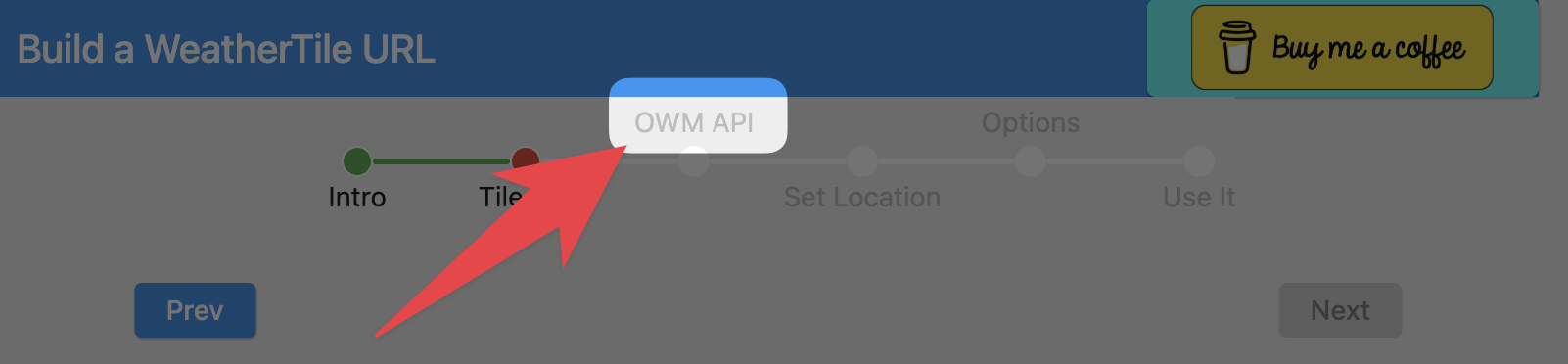
Isn’t the Code Buffer example using Open Weather Map under the hood? I didn’t proceed through the steps, but I noticed that it shows ‘OWM API’ in the steps which I presume is Open Weather Map.
Can you share more details about the configuration you tried in the Weather Tile - Open Weather - Current and Forecast custom tile? I’d be interested to try to reproduce to see if there’s a bug of some sort.
Yes. It appears Open Weather Map IS under the hood of the Codebuffer implementation.
I think I missed that as it uses the Acronym OWM.
However ,the Codebuffer method really makes it a Click next- Add details and information to achieve a useable Weather Tile from URL.
Simple to understand questions and an automated web based form to create a Weather Tile. One can even customize the background color of the Weather tile to match thier dashboard colors. I used a Hex Color picker from the web to sample the current colors of my Dashboard icons. Found here - https://imagecolorpicker.com/
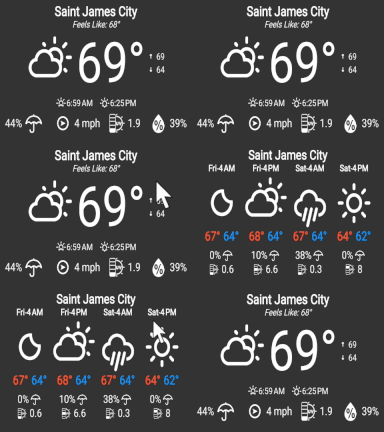
Additionally one can single press/click the Custom Weather tile and it toggles to a 4 Day Weather Forecast view. Then another press / click to toggle back.
I think I screwed up by editing the tile in Developer Mode - I added Latitude and Longitude as well as possibly other details. I notice that the instructions state not to do that. In any case I ended up with a tile that was bright blue and had yellow lettering for the icons/images. This was far from my desired color scheme, but decided to run with it for a day or two to observe its behavior and that’s when I found that it was not updating the weather data at regular pre-defined intervals.
I scraped the idea of using OWM for weather reporting after this.
The codebuffer method makes it simpler to achieve a weather tile that can be used within one’s dashboard . At least to my brain it does.
So it says I need to upgrade to use custom tiles. Is there anyway to show the weather using smartthings without having to upgrade sharptools to a paid edition?
Using the codebuffer.net process requires one to create a “custom tile”. Custom tiles are part of the Premium subscription model so there is no way that I know of to use a “custom tile” without the subscription.
Many community members find a local weather station that provides weather images at a static URL and use that with a Media Tile. That’s out of scope of Bruce’s thread though.
This is a viable option if one is willing to accept the colors and layout of the weather images and text provided on the local weather station. One looses the ability to customize the data and information to some degree .
I too was using both ActionTiles and the “custom weather tile” from codebuffer’s weather_action_tiles . I had been using the custom weather tile for over a year, but lost the long custom URL when ActionTiles went down. I was using both the wide & narrow versions of the weather tile on two different panels.
I looked at SharpTool’s “Weather Tile - Open Weather - Current and Forecast custom tile” too, and although it very similar, I do like that the CodeBuffer has a few things SharpTool’s weather tile does not appear to include: Today’s High&Low forecasted temps on the main screen, the current wind direction, UV index, and the ability to see the upcoming forecast just by tapping it. This gif is from codebuffer’s weather_action_tiles website showing the behavior.
I went back to codebuffer’s weather_action_tiles and it was easy enough to step through the process to rebuild the URL, codebuffer’s system remembered the inputs I made before.
Besides being able to set the background and text colors to anything you want, I saw that codebuffer has included the standard Sharptools theme colors for ease of use.
I have not yet decided which direction I will be going in regards to a new panel provider, but I will definately be keeping CodeBuffer’s weather tile in mind.