A real-time UPS monitoring dashboard with animated voltage gauges, battery visualization, and power failure tracking - designed for NUT (Network UPS Tools) integration.
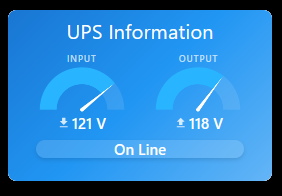
 Mini Version
Overview
Power reliability is critical for home servers, network equipment, and smart home hubs. UPS Information v2.2 provides grade monitoring of your uninterruptible power supply with real-time voltage tracking, battery status, and automated failure detection.
Built specifically for integration with NUT (Network UPS Tools), this tile displays comprehensive UPS metrics with smooth animated gauges, visual battery indicators, and intelligent status detection based on NUT protocol codes.
Perfect for:
- Smart home infrastructure reliability
- Power quality monitoring
 Key Features
- Animated Voltage Gauges - Smooth, realistic analog-style meters for input/output voltage
- 10-Segment Battery Display - Color-coded visual indicator (critical/low/medium/good)
- Smart Power Source Detection - Automatic UTILITY/BATTERY badge with color coding
- NUT Status Codes - Full support for Network UPS Tools protocol status messages
- Failure Tracking:
- Last power failure timestamp
- Duration of outage
- Uptime since power restoration
- Real-time ongoing outage duration
- Visual Alerts:
- Green gradient = On utility power
- Red gradient = Running on battery
- Animated transitions between states
- Real-time Updates - Instant synchronization with UPS state changes
 Requirements
Required:
- SharpTools Premium subscription
- NUT (Network UPS Tools) server configured
- Integration platform (Home Assistant, Node-RED, etc.) to bridge NUT data
- SharpTools devices/variables configured with UPS data
Device/Variable Setup:
Devices (with voltageMeasurement or battery capability):
- Input Voltage device
- Output Voltage device
- Battery Charge device
- UPS Status Data device (for NUT status codes)
Variables (Number type, updated by automation):
- Last Failure timestamp
- Power Back timestamp
Note: Variables require external automation to update when power events occur. The tile reads these values but doesn’t write them.
 Quick Import
Import SharpTools Tile: UPS Information v.2.1
Mini Version Download
Import SharpTools Tile: UPS Information v2.2 (Mini)
 Configuration
Step 1: Set Up NUT Integration
You need to bridge NUT data to SharpTools. Common approaches:
Option A: Home Assistant
- Install NUT integration
- Create template sensors for voltage/battery
- Sync to SharpTools via official integration
Option B: Node-RED
- Use NUT nodes to query UPS
- Create virtual devices in SharpTools
- Update via API
Option C: Custom Script
- Query NUT via
upsccommand - Parse output
- Update SharpTools devices/variables via API
Step 2: Configure Tile Settings
After adding to dashboard:
Devices:
- Input Voltage Device - Device reporting input voltage (from utility)
- Output Voltage Device - Device reporting output voltage (to equipment)
- Battery Charge Device - Device reporting battery percentage
- UPS Status Data Device - Device with NUT status attribute
Variables:
- Last Failure Variable - Timestamp (ms) of last power failure
- Power Back Variable - Timestamp (ms) when power returned
Step 3: Create Automation for Timestamps
You need automation to update the timestamp variables when power events occur:
Trigger: UPS status changes to “OB” (On Battery) Action: Update “Last Failure Variable” with current timestamp
Trigger: UPS status changes to “OL” (Online/Utility) Action: Update “Power Back Variable” with current timestamp
 Understanding NUT Status Codes
The tile displays human-readable descriptions of NUT status codes:
- OL - UPS is using utility power and supplying the load
- OB - Utility power failed, UPS is running on battery
- LB - Battery is nearly depleted, shutdown imminent
- CHRG - Battery is recharging from utility power
- DISCHRG - Battery is being used to power the load
- RB - Battery needs replacement
- BYPASS - Load connected directly to utility
- CAL - UPS is performing calibration
- TRIM - UPS reducing input voltage
- BOOST - UPS boosting input voltage
- ALARM - UPS signaling a fault
- FSD - Shutdown command issued
The tile intelligently detects status based on voltage and battery readings even if the status device doesn’t report all codes.
 Visual Indicators
Voltage Gauges:
- Range: 90-130V (adjustable)
- Smooth animated needle movement
- Real-time updates as voltage changes
Battery Display:
- 10 segments fill based on charge level
- Color coding:
- Green - Good (80-100%)
- Yellow - Medium (50-80%)
- Orange - Low (20-50%)
- Red - Critical (<20%)
Power Source Badge:
- Green “UTILITY” - Running on mains power
- Orange “BATTERY” - Running on battery backup
Background Gradient:
- Blue - Normal operation on utility
- Red - Power failure, running on battery
 Display Optimization
This tile has been specifically optimized for iOS devices screens.
For customization of voltage ranges, gauge colors, or battery thresholds, I recommend using Claude.AI to help modify the configuration values.
 Technical Details
Gauge Library: Uses gauge.js for smooth animated analog-style voltage meters with realistic needle movement.
Update Frequency:
- Voltage/battery: Real-time on value change
- Status: Polled every 10 seconds
- Uptime: Updated every minute
Smart Status Detection: If your NUT status device doesn’t report all codes, the tile can infer status:
- Input voltage >90V = likely OL (online)
- Input voltage <90V = likely OB (on battery)
- Battery ≥99% with utility = OL
- Battery <99% with utility = CHRG (charging)
- Battery ≤20% without utility = LB (low battery)
 Screenshots
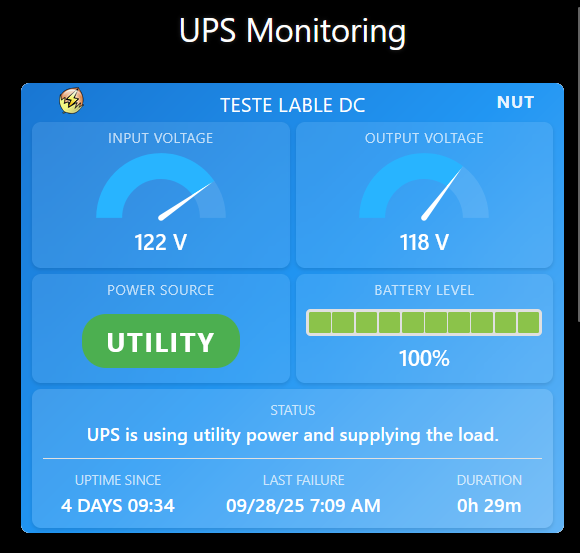
The screenshot shows the tile monitoring a UPS on utility power with:
- Input: 122V, Output: 118V (normal range)
- Battery: 100% fully charged (10 green segments)
- Power Source: UTILITY (green badge)
- Status: “UPS is using utility power and supplying the load”
- Uptime: 4 days since last restoration
- Last failure: 09/28/25 at 7:09 AM
- Duration: 29 minutes (of that outage)
 Resources
GitHub Repository: GitHub - wilsonmarcolin/sharptools-custom-tiles: SharpTools Custom Tiles by Wilson Marcolin & Claude AI
NUT Documentation:
Integration Examples:
- Home Assistant NUT integration
- Node-RED NUT flow (see GitHub)
- Python NUT client scripts
Other Tiles in Collection:
- AC Control - Climate control
- SpeedTest Monitor - Network monitoring
- Weather Information - Multi-source weather
 About the Developer
I’m not a professional developer—I’m a home lab enthusiast who needed better UPS monitoring than the vendor-provided software offered. This tile brings grade visualization to a critical but often overlooked piece of infrastructure.
The smooth gauge animations and intelligent status detection have made UPS monitoring something I enjoy checking, rather than a chore.
If you encounter any issues or have suggestions, feel free to share feedback! However, please understand that support may be limited as this is a personal project shared freely with the community.
Apologies in advance for any operational flaws!
 License & Disclaimer
MIT License - Free to use, modify, and distribute
USE AT YOUR OWN RISK - This tile displays data from your UPS monitoring setup but cannot control the UPS or prevent power failures. Ensure your NUT configuration and automation are tested and reliable. The author is not responsible for equipment damage, data loss, or power-related issues.
See GitHub repository for complete license, disclaimer, and integration examples.
Version: 2.2 (October 2025)
Authors: Wilson Marcolin & Claude.AI
Tested with: SharpTools Custom Tiles v0.2.1+
Powered by: Network UPS Tools (NUT)
Tags: #custom-tile #ups #power-monitoring #nut #network-ups-tools #battery #voltage #server-monitoring #home-lab