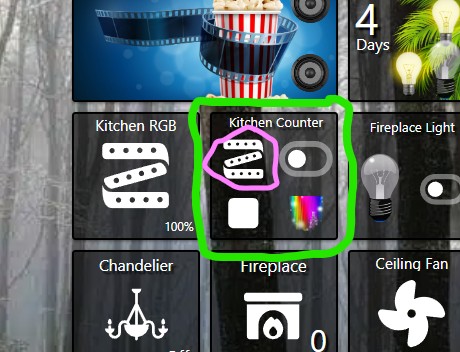
Hey @josh ,
I was tinkering with a super tile for my kitchen RGB strip. There dosen’t seem to be a setting to open a color picker for that device, even though I can do this with a regular tile. Am I missing something?
Thanks in advance.
Hey @josh ,
I was tinkering with a super tile for my kitchen RGB strip. There dosen’t seem to be a setting to open a color picker for that device, even though I can do this with a regular tile. Am I missing something?
Thanks in advance.
The Thing action in a Super Tile supports basic commands that don’t require any parameters.
Another community member created some feature requests around this if you want to cast a vote and perhaps share a comment with your use-case:
There’s also some other alternative approaches / workarounds depending on your needs. For example, some people like to have a set of ‘favorite’ values and they create a dashboard with those favorites, then open the dashboard as an overlay.
So the experience ends up feeling like you tap the LED strip icon and it brings up an overlay with your favorite colors you can pick from.
Perhaps you can explain more about what you are trying to accomplish? If you want the ability to control the color, on/off state, and level of a single color control device, then using the standard Color Control layout is a better fit as it’s like a mini-app that handles all of those cases.