I know this is an old thread. I need help with two things, 1) better parenting skills and 2) expanded PIN protection for the Sharptools dashboard. I have a 14 year old with restricted computer time. I have a smart plug in a lock box that turns on and off his monitor and speakers at set hours. My SmartThings app is password secured and he has not figured how to bypass that yet. Mom wants the computer smartplug on the Sharptools dashboard with a PIN so she can give him more time. She does not want to go into Smarttings and I don’t want her to either. The kid does not know the PIN to Sharptools. I have two tablets wall mounted in the house and Mom and I use the dashboard on our phones.
To give himself more computer time, my son will go to one of the wall tablets and hit the browser back button to get out of kiosk mode, and then will go to edit and add a second instance of the pin protected tile, go back to view, turn it on, and then delete the second tile he made. I have also seen him make a new dashboard and just add the one tile so he can control it without the pin. I cleared the history on the tablet and copied a link to the kiosk view dashboard so he can’t hit the back button but he just types in the root URL and gets access.
I don’t know if this request has come up before, but it seems like it would be useful to expand the utility of the PIN protection:
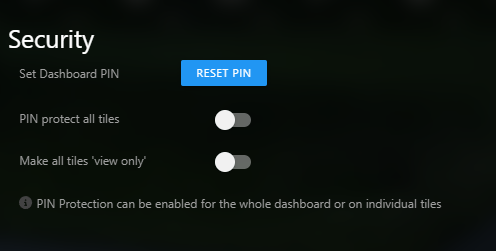
Perhaps to include a third toggle “Require PIN to Configure”. If that toggle was on, then the PIN prompt would come up to:
- Edit Dashboard
- Add a Dashboard
- Delete a Dashboard
- View Configuration
A downside to this, is that if you forgot your PIN you would be locked out. Perhaps you could add a forgot PIN override with entering the account password.
Thank you for your help with this. Great product and great support, greatly appreciated.