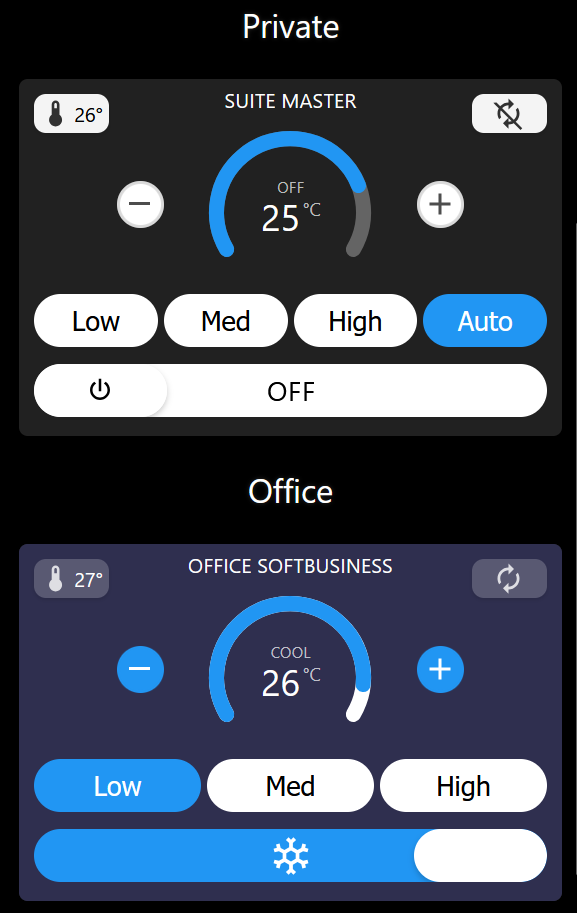
A sleek, circular gauge thermostat interface designed for intuitive air conditioning control with mobile-optimized touch interactions.
 Overview
AC Control v5.3 is a custom tile that transforms your SharpTools dashboard into a beautiful, touch-friendly thermostat controller. Featuring a 270° circular temperature gauge, drag-enabled power toggle, and configurable fan speed controls, this tile brings modern mobile UI design to your smart home control panel.
Perfect for controlling air conditioning units, mini-splits, or any cooling-only thermostat device.
 Key Features
- Circular Temperature Gauge - Elegant 270° arc display with real-time temperature visualization
- Touch-Optimized Controls - Large +/- buttons designed for mobile and tablet screens
- Drag Power Toggle - Swipe the power slider left/right for satisfying tactile control
- Configurable Fan Speeds - Enable only the modes your AC supports (On/Low/Med/High/Auto)
- External Sensor Support - Display temperature and contact sensor data in the top corners
 Requirements
Required:
- SharpTools Premium subscription
- Thermostat device with standard capabilities (SmartThings, Hubitat, Home Assistant)
Supported Attributes:
thermostatMode(cool/heat/off)coolingSetpointorheatingSetpointtemperature(current temperature)thermostatFanMode(on/low/medium/high/auto)
Optional:
- External temperature sensor (temperatureMeasurement capability)
- Contact sensor for door/window status
 File to import
Import SharpTools Tile: AC Control v5.3
 Configuration
Step 1: Select Your Device
After importing, add the tile to your dashboard and select your air conditioner or thermostat device.
Step 2: Customize Settings
Basic Settings:
- Custom Label - Override the device name displayed on the tile
- Active Color - Choose the color when AC is running (hex format, e.g.,
#0094C9)
Temperature Limits:
- Minimum Temperature - Lowest allowed setpoint (default: 18°C)
- Maximum Temperature - Highest allowed setpoint (default: 28°C)
Fan Speed Options: Enable only the fan modes your AC unit supports:
- Fan: ON
- Fan: LOW (enabled by default)
- Fan: MEDIUM (enabled by default)
- Fan: HIGH (enabled by default)
- Fan: AUTO
External Sensors (Optional):
- Temperature Sensor - Display external room temperature in top-left corner
- Contact Sensor - Show door/window status in top-right corner
 Display Optimization
This tile has been specifically optimized for iOS devices screens.
For customization or layout adjustments to fit different screen configurations, I recommend using Claude.AI to help modify the tile’s CSS variables and responsive breakpoints.
 Usage Tips
Power Control:
- Tap the OFF/ON label to toggle power
- Drag the power slider left/right for tactile control
- The slider snaps to OFF or ON based on drag distance
Temperature Adjustment:
- Use the large + and - buttons on either side of the gauge
- Changes are debounced to prevent excessive commands
- Temperature updates immediately on the gauge
Fan Speed:
- Tap any fan speed button to change modes
- Active mode is highlighted in blue
- Only configured fan modes will be displayed
Visual Feedback:
- Blue background = Cooling mode active
- White/Dark background = Off state
- Gauge arc fills based on setpoint vs. temperature range
 Customization Examples
Change Active Color: Set your preferred color in hex format:
- Cyan:
#0094C9(default) - Blue:
#2196F3 - Green:
#4CAF50 - Purple:
#9C27B0
Simplify Fan Controls: Disable unnecessary fan modes by unchecking options you don’t use. The tile will only show buttons for enabled modes.
 Screenshots
The screenshots above show the tile in both active (cooling) and inactive states, demonstrating the responsive design and color schemes.
 Resources
GitHub Repository: GitHub - wilsonmarcolin/sharptools-custom-tiles: SharpTools Custom Tiles by Wilson Marcolin & Claude AI
Other Tiles in Collection:
- HT Sensor - Humidity & Temperature monitoring
- Weather Information - Multi-source weather tile
- UPS Information - UPS monitoring via NUT
- SpeedTest - Network speed testing
 About the Developer
I’m not a professional developer - I simply enjoy creating beautiful and well-crafted interfaces for smart home control. This tile is the result of that passion combined with AI assistance from Claude.AI.
The tile has been optimized through multiple iterations (v5.3) with improved performance, consolidated code, and enhanced user experience based on real-world usage.
If you encounter any issues or have suggestions for improvements, feel free to share feedback! However, please understand that support may be limited as this is a personal project shared freely with the community.
Apologies in advance for any operational flaws!
 License & Disclaimer
MIT License - Free to use, modify, and distribute
USE AT YOUR OWN RISK - This tile is provided AS-IS without warranties. Test thoroughly before production use. The author is not responsible for any issues, device malfunctions, or unintended behavior.
See GitHub repository for complete license and disclaimer.
Version: 5.3 (October 2025)
Authors: Wilson Marcolin & Claude.AI
Tested with: SharpTools Custom Tiles v0.2.1+
Tags: #custom-tile #thermostat #climate-control #air-conditioning #mobile-optimized #ios
 Major Upgrade Available!
 Bidirectional sync for mode and temperature settings
 Important: New Requirement
 Migrating from v5.x?